Digital asset inventory: benefits, tools & practical implementation
Manual Excel lists and paper-based processes cost unnecessarily much time during the inventory and are error-prone. A digital asset inventory provides a remedy – this article shows the most important benefits, the right technologies and the path to practical implementation.
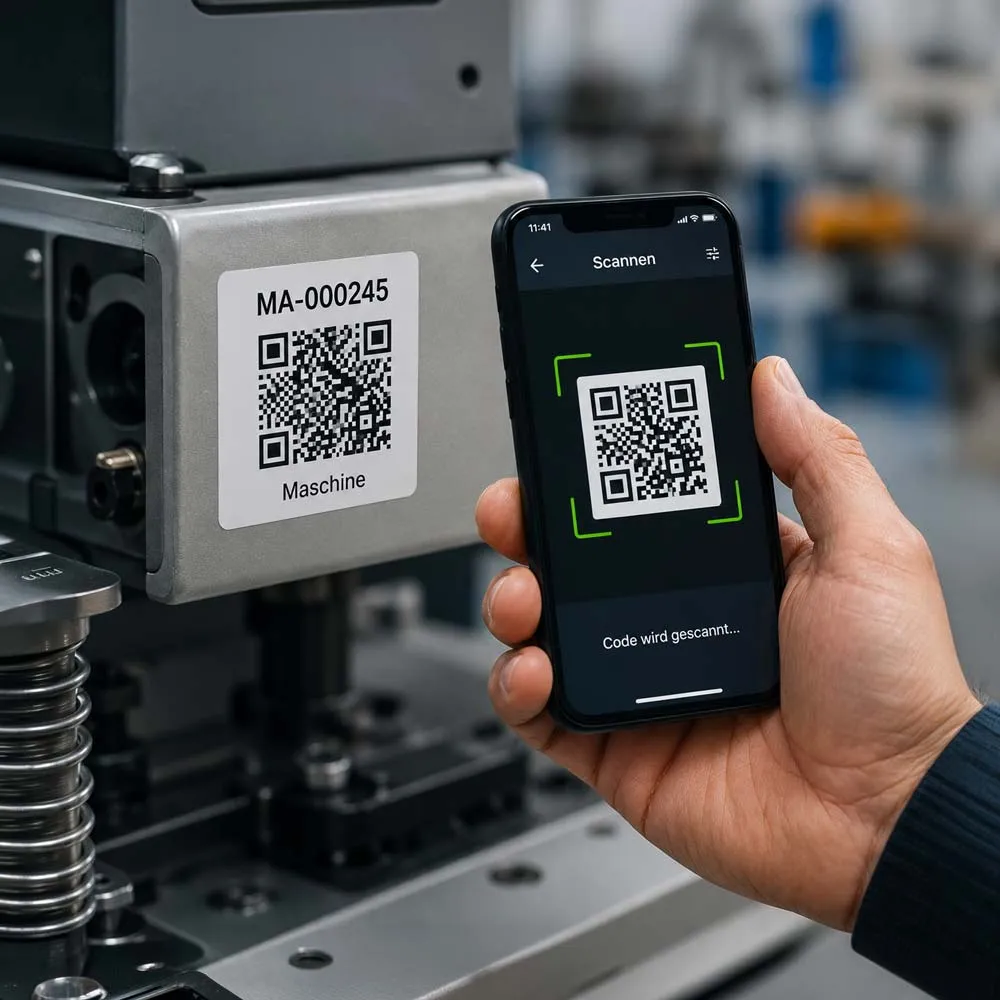
Digital asset inventory at a glance
A digital asset inventory replaces manual Excel lists and paper-based inventory processes with a central, digital solution. Companies capture their assets using QR codes, barcodes or RFID technology and manage all inventory data in central software.
The most important benefits are:
- up to 80% time savings for inventories
- fewer capture errors thanks to digital processes
- an up-to-date overview of all assets at any time
- higher transparency and traceability
- easy scaling as the inventory stock grows
Companies with many locations or a large number of operating resources in particular benefit from a digital asset inventory.
What is a digital asset inventory?
In a digital asset inventory, all of a company’s assets are captured electronically, clearly labelled and managed centrally. Instead of handwritten lists or Excel files, modern technologies and mobile devices are used.
The most common identification technologies include:
- QR codes for fast and cost-effective labelling
- Barcodes as a proven standard solution
- RFID tags, which can even capture inventory items contactlessly
Employees scan the labels with a smartphone or tablet and immediately access all relevant information – for example location, responsible person, acquisition date or maintenance status. This creates an up-to-date and transparent asset register at all times.
Why do Excel lists reach their limits during the inventory?
Many companies still manage their inventory with Excel tables. This approach often only works as long as the number of assets remains manageable.
As company size increases, however, typical problems arise:
- duplicate or outdated records
- a lack of transparency about locations
- high manual maintenance effort
- error-prone inventory processes
- no real-time information
- time-consuming coordination between different departments
Especially for annual inventories or location changes, these weaknesses cause considerable time expenditure and avoidable costs.
The most important benefits of digital inventory management
1. Significantly less time expenditure
By scanning QR codes or RFID tags, capture takes place within a few seconds. Manual lists are completely eliminated. Many companies significantly reduce the time expenditure of their inventories as a result.
2. Fewer errors
Automated data capture prevents transfer errors, duplicate entries or forgotten assets. All changes are saved immediately in the system.
3. Central data basis
All information is in one place. Employees can trace at any time:
- where an inventory item is located
- who is responsible for it
- when maintenance was carried out
- which assets are missing or need to be replaced
4. Higher transparency
Digital inventory management creates transparency over the entire lifecycle of an asset – from acquisition to disposal. This makes it possible to plan investments better and avoid unnecessary replacement purchases.
5. Scalability
While Excel lists quickly become confusing as the amount of data increases, professional inventory software grows effortlessly with the company.
Which technologies are used in the digital asset inventory?
Depending on company size and requirements, different identification methods are used.
QR codes
QR codes are inexpensive, easy to create and can be scanned with almost any smartphone. They are suitable for most companies as an entry point into digital inventory management.
Barcodes
Barcodes have been established for many years and are particularly useful when scanners or corresponding processes are already in place.
RFID
RFID technology enables the contactless capture of several inventory items simultaneously. It is particularly suitable for large stocks or companies with a very large number of assets.
How to successfully introduce a digital asset inventory
The introduction usually takes place in a few clear steps.
Step 1: Prepare existing inventory data
Existing Excel lists and inventory registers are cleaned up and brought into a uniform structure.
Step 2: Label the assets
All assets are given a unique QR code, barcode or RFID tag. This allows each asset to be identified clearly.
Step 3: Introduce mobile data capture
Employees capture inventory items directly on site with a smartphone or tablet. Changes are synchronised immediately.
Step 4: Standardise processes
Uniform procedures ensure that inventory data remains permanently up to date and traceable at all times.
Which companies benefit from a digital asset inventory?
Digital inventory management offers advantages for almost every organisation, especially when:
- several locations are managed
- many employees have access to operating resources
- inventories are carried out regularly
- maintenance has to be documented
- there is a large number of machines, devices or IT assets
The larger the asset stock, the higher the economic benefit of a digital solution is, as a rule.
Why specialised inventory software makes sense
Professional solutions such as INVENTIRE bundle all inventory data in a central platform. In addition to mobile data capture, modern systems offer, among other things:
- digital asset management
- QR code and RFID support
- inventory via smartphone or tablet
- a history of all changes
- location management
- responsibilities per asset
- evaluations and reports
- easy collaboration of several employees
This makes the inventory not only faster but also permanently traceable and audit-proof documentation.
Conclusion
The digital asset inventory is increasingly becoming the standard of modern company administration. It reduces manual effort, minimises sources of error and creates transparency over all assets at any time.
Companies benefit from more efficient processes, better data quality and a much easier execution of future inventories. Those who digitalise their inventory in the long term also lay the foundation for professional asset management and create the conditions for further company growth.