Asset inventory app for companies: functions, offline mode and ERP integration
In short: With an asset inventory app, companies capture fixed assets mobile via barcode, QR code or RFID – even offline – and then reconcile the data with inventory software or an ERP system.

Why an app for the asset inventory?
Paper lists, printed asset registers and manually maintained Excel tables make the asset inventory more difficult. Information often has to be transferred several times, discrepancies are noticed late, and the current location of an asset is not always clearly documented.
An asset inventory app moves the capture directly to the place where the respective asset is located. Employees can scan labels, check stored data, document changes and then reconcile the results with central inventory software, asset accounting or an ERP system.
However, not every mobile application is suitable for every asset stock and every inventory process. This guide shows which functions an asset inventory app should offer, how an offline inventory works and what companies need to consider when choosing one.
What is an asset inventory app?
An asset inventory app is a mobile application for capturing and checking physical assets. It is typically used on smartphones, tablets or dedicated mobile scanners.
During the asset inventory, employees can, for example:
- scan barcodes or QR codes,
- capture RFID tags,
- check existing asset data,
- update locations and responsibilities,
- document conditions and damage,
- take photos,
- add unknown assets,
- flag missing assets,
- synchronise inventory results with a central system.
The app is usually not the sole management system. It serves as a mobile capture component and works together with a central data basis.
Asset inventory app or inventory software: what is the difference?
The terms asset inventory app and inventory software are sometimes used synonymously. However, they describe different components of a digital inventory and management process.
| Solution | Main task |
|---|---|
| Asset inventory app | Mobile capture and control of assets on site |
| Inventory software | Central management of assets, locations, conditions and responsibilities |
| Asset accounting | Accounting-based management and valuation of fixed assets |
| ERP system | Overarching control of commercial and operational processes |
| Warehouse management | Management of stock levels, warehouse movements and withdrawals |
An asset inventory app can be part of comprehensive inventory software. But it can also be connected to asset accounting or an ERP system as a standalone application.
For companies, it is therefore not only decisive what the mobile app does during capture. It is equally important how the collected data is subsequently checked, evaluated and transferred to existing systems.
What is the difference between an asset inventory and a stock inventory?
An asset inventory focuses on long-term assets and operating resources. These can include, for example:
- machines,
- IT devices,
- office equipment,
- tools,
- vehicles,
- medical devices,
- technical installations.
A stock inventory, on the other hand, typically focuses on goods, raw materials, consumables and saleable stock.
This distinction is important when selecting software. A warehouse management app often has to control quantities, batches, withdrawals and stock movements. An asset inventory app, on the other hand, mainly needs functions for unique identification, location assignment, responsibilities, condition, history and reconciliation with the asset master data.
Which companies is an asset inventory app suitable for?
A mobile asset inventory is particularly useful when:
- numerous assets have to be checked,
- several buildings or locations are involved,
- different inventory teams work in parallel,
- assets regularly change their location,
- existing asset data has to be checked,
- photos or condition information should be documented,
- inventory takes place in areas with limited internet reception,
- results have to be transferred to asset accounting or an ERP system.
For a very small asset stock at a single location, a simple table may be sufficient at first. As soon as several people, locations or data sources are involved, however, the coordination and control effort increases significantly.
Which functions should an asset inventory app offer?
The following eight function areas can be expanded individually:
1. Barcode and QR code capture
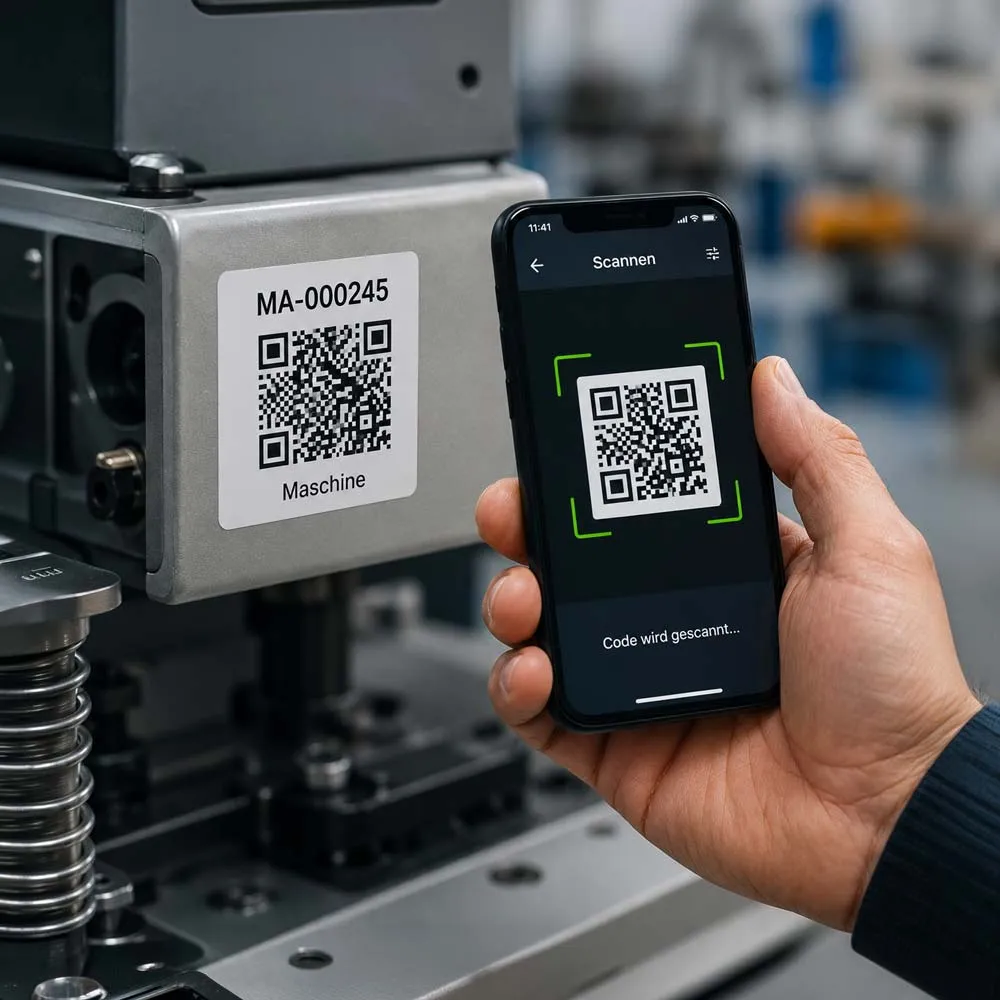
Barcodes and QR codes can usually be captured via the camera of a smartphone or tablet. Alternatively, external handheld scanners can be used.
After the scan, the app should clearly call up the associated asset and display the existing information. Inventory numbers therefore do not have to be entered manually.
Important questions to check are:
- Which code formats are supported?
- Does the scan also work with small or slightly damaged labels?
- Can external scanners be used?
- Can existing asset labels be used?
- How are unknown or unassigned codes handled?
Existing labels can often be reused, provided they are unique, legible and compatible with the chosen system. How labels and codes can be optimally combined is shown in the article on the asset inventory with RFID and QR codes.
2. RFID support
RFID can be useful when assets are to be captured without direct line of sight or when several objects are to be captured in a short time.
Depending on the use case, special RFID tags and compatible readers are required. A smartphone alone does not automatically support all RFID methods relevant to the asset inventory.
Before deciding, companies should check:
- Which RFID technology is supported?
- Which readers are required?
- How large is the possible read range?
- Can several tags be recognised simultaneously?
- How are accidental multiple captures avoided?
- What additional costs arise?
For many standard inventories, QR codes or barcodes are the simpler and more cost-effective solution. RFID is mainly suitable for special operating conditions or larger capture volumes.
3. Full offline mode
Asset inventories do not always take place in areas with reliable Wi-Fi or mobile coverage. Basements, warehouses, production areas, outdoor areas or shielded rooms can prevent a stable connection.
A suitable asset inventory app should therefore be usable offline.
Before the inventory begins, the required asset, location and order data are transferred to the mobile device. During capture, the app then works with this local data set. The results are synchronised with the central system as soon as a connection is available again.
Companies should check:
- Which functions are available offline?
- Can photos and condition changes be saved offline?
- Can unknown assets be documented offline?
- How long does data remain available on the device?
- How is locally stored data protected?
- What happens if the device is lost or damaged?
- How are parallel changes handled after synchronisation?
A full offline mode should not only allow scanning. Location changes, notes, photos and the flagging of discrepancies should also work without an internet connection where possible.
4. Location, room and cost-centre assignment
During the asset inventory, it is not always enough to simply establish that an asset exists. Often it also has to be documented where it is located and which organisational unit it is assigned to.
An asset inventory app should therefore be able to map building, floor, room, cost-centre and location structures.
Typical use cases are:
- relocation of an asset to another room,
- change between branches,
- assignment to a different cost centre,
- handover to a new responsible person,
- documentation of a temporary location.
GPS coordinates can be additionally helpful outdoors. Inside buildings, assignment via defined building and room structures is usually more meaningful.
5. Condition and photo documentation
During the asset inventory, damage, changes or missing components may become visible.
A mobile app should therefore enable the direct capture of the following information:
- condition,
- remarks,
- damage,
- serial numbers,
- photos,
- responsible person,
- check or clarification notes.
Photos should be clearly assigned to the respective asset and the time of capture. In addition, it must be organisationally defined who checks and approves documented discrepancies after the inventory.
6. Target/actual comparison with the asset master data
The app should compare the information captured on site with the prepared asset master data.
Various results can arise here:
- asset present and correctly assigned,
- asset present, but at a different location,
- asset present, but in a differing condition,
- asset not found,
- asset discovered without an existing record,
- label damaged or illegible,
- asset captured twice or inconsistently.
In online operation, the comparison can take place immediately with the central system. In offline operation, it is first checked against the locally provided data set. Central changes and possible conflicts are processed after synchronisation.
7. Support for parallel inventory teams
For larger asset inventories, several teams often work at the same time. The software should therefore be able to assign inventory areas, buildings, floors or rooms to different people.
A transparent rule for overlaps is important:
- Can two teams capture the same asset?
- Is a duplicate capture displayed?
- Which change is applied?
- Is the change history preserved?
- Can conflicts be checked manually?
- Is it traceable who made a change?
- Can areas be locked or reserved for certain teams?
Simply applying the latest timestamp may be sufficient for simple processes. For important master data, however, a traceable conflict check should be possible.
8. Reporting and data export
After the asset inventory is completed, the results have to be checked, approved and processed further.
A suitable solution should enable, among others, the following evaluations:
- fully captured assets,
- assets not found,
- newly discovered objects,
- location discrepancies,
- condition changes,
- damaged or illegible labels,
- inventory progress by location,
- processing status of open discrepancies.
In addition, it should be documented who captured or changed an asset and when. Such a history supports the traceable documentation of the inventory process.
How does an asset inventory with an app work?
1. Prepare the asset master data
The existing asset master data is taken over from asset accounting, the ERP system or a table.
This data should be checked before the inventory:
- duplicate records,
- missing inventory numbers,
- incomplete location details,
- invalid cost centres,
- employees who have left,
- rooms that no longer exist,
- assets that have already been disposed of.
A mobile app can only partly correct the quality of poor master data. A clean preparation therefore remains important.
2. Define inventory areas
Buildings, floors, rooms, locations or cost centres are divided into meaningful inventory areas.
Responsibilities and inventory teams are then defined. For larger projects, it is advisable to assign the areas clearly so that duplicate work is avoided.
3. Transfer data to the mobile devices
The required records are loaded onto smartphones, tablets or scanners. This step is particularly necessary for a later offline inventory.
Before starting, it should be checked whether:
- all relevant assets are present,
- the correct locations have been loaded,
- users have access to their areas,
- scanners and cameras work,
- there is sufficient battery capacity.
4. Capture assets on site
Employees scan the label of the respective asset and check the displayed information.
Where necessary, the following details are added or changed:
- location,
- room,
- cost centre,
- responsible person,
- condition,
- note,
- photo,
- missing or new label.
Unknown objects or objects that cannot be clearly assigned should be saved as a clarification case instead of being immediately transferred to the asset master data unchecked.
5. Synchronise results
After the mobile capture, the data is reconciled with the central system. For an offline inventory, this step takes place as soon as a suitable connection is available again.
Before the final transfer, the system should display possible duplicate and conflict cases.
6. Process discrepancies
Missing, unknown or inconsistently captured assets are checked by the respective responsible persons.
Possible clarifications are:
- asset was moved to another room,
- inventory label was damaged,
- asset was already disposed of,
- asset is present, but incorrectly assigned,
- new object has not yet been created in the asset master data,
- asset could not be found.
7. Complete the asset inventory
After processing all open items, the result is approved and exported for further use or transferred to the connected asset accounting or ERP system.
Selection criteria for an asset inventory app
| Criterion | Important question to check |
|---|---|
| Offline use | Which functions are available without an internet connection? |
| Device support | Does the app run on the existing smartphones, tablets and scanners? |
| Scan methods | Are QR code, barcode and, where applicable, RFID supported? |
| Asset labels | Can existing labels be reused? |
| Multi-user operation | Can several inventory teams work in parallel? |
| Conflict management | How are duplicate or inconsistent changes handled? |
| Location structure | Can buildings, rooms, cost centres and responsibilities be mapped? |
| Documentation | Can photos, conditions and remarks be captured? |
| Data import | Which data formats and source systems are supported? |
| Interfaces | Is a connection to ERP and asset accounting possible? |
| Security | How are access, mobile devices and locally stored data protected? |
| Hosting | Are there cloud, on-premises or hybrid operating models? |
| Licence model | Is it billed per user, device, asset, location or installation? |
| Introduction | What support is there for data migration, setup and training? |
| Data export | Can all data be output completely and in a usable format? |
What solution approaches are there?
Asset accounting or ERP system with an app module
A mobile module within an existing system often enables a direct connection to existing master and accounting data.
Typical strength: central data basis and close system integration
Possible limitation: mobile operation, offline capability and scan functions can vary depending on the system.
Standalone asset inventory app
A standalone app focuses on mobile capture and is connected to existing systems via imports, exports or interfaces.
Typical strength: focused mobile operation and fast capture
Possible limitation: additional integration and coordination effort
Comprehensive inventory software with a mobile app
Inventory software combines the mobile asset inventory with the ongoing management of locations, responsibilities, conditions and histories.
Typical strength: asset inventory and ongoing asset management in one system
Possible limitation: a larger introduction scope than a pure capture app
Individual or low-code solution
Companies can build their own applications on low-code platforms or as custom development.
Typical strength: high adaptability to special processes
Possible limitation: development, maintenance, security and further development remain the responsibility of the company or service provider.
INVENTIRE as an example of an asset inventory app
INVENTIRE combines the mobile capture of assets with a central solution for the asset inventory. According to the provider, the software can be used both cloud-based and on-premises.
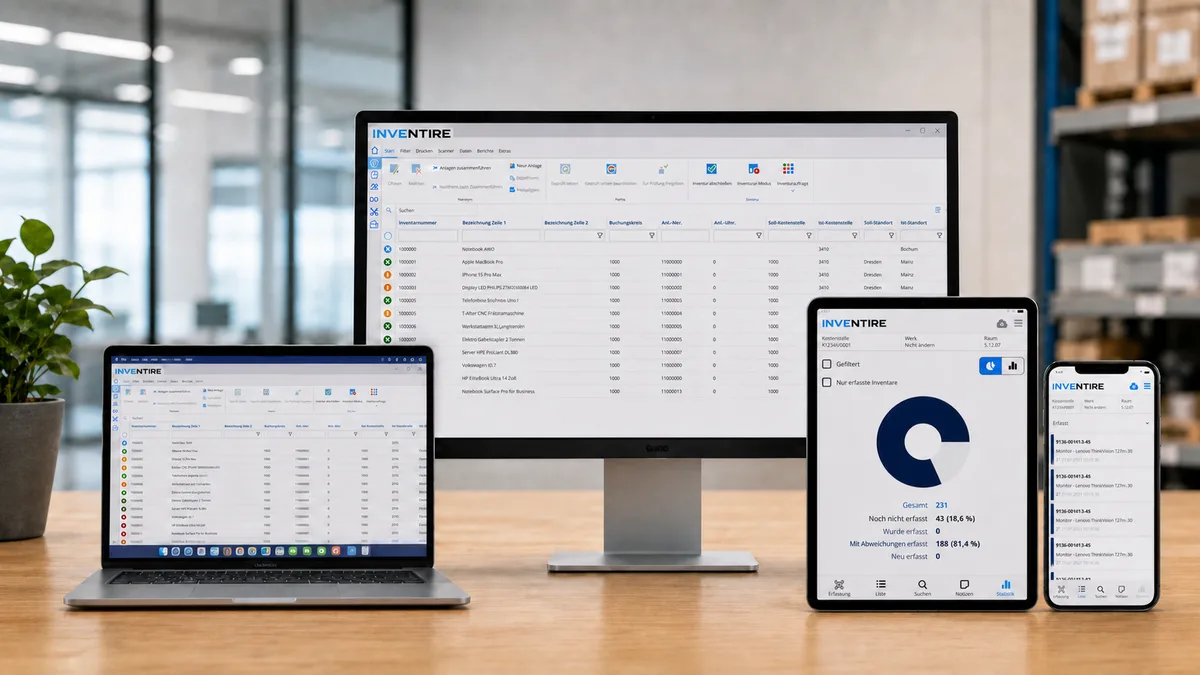
The described functions include:
- capture via barcode, QR code or RFID,
- an asset inventory that can be carried out fully offline,
- taking over existing asset and label data,
- parallel work of several inventory teams,
- documentation of locations and conditions,
- transfer of the results to connected systems,
- interfaces to ERP and accounting solutions.
Possible integrations mentioned include DATEV, SAP, Oracle, Infor, Diamant and Microsoft Dynamics.
According to INVENTIRE, the licence model is calculated per installation and not per user or asset. Before making a decision, companies should request an individual offer and also take into account one-off costs for introduction, data migration, interfaces, labels and training.
More about the INVENTIRE inventory software
Advantages of a mobile asset inventory app
A suitable asset inventory app can:
- reduce manual data entry,
- avoid transfer errors,
- enable capture directly at the asset,
- support inventories in areas without internet access,
- coordinate several inventory teams,
- document location and condition changes,
- make discrepancies visible more quickly,
- simplify the evaluation and transfer of the results.
How large the actual time saving is depends, among other things, on the quality of the source data, the number of assets, the number of locations, the labelling and the previous workflows.
Blanket savings figures are therefore only meaningful if the underlying conditions are documented traceably.
Possible limitations and disadvantages
An asset inventory app alone does not solve all organisational problems.
Possible challenges are:
- incomplete or outdated asset data,
- damaged or missing labels,
- unclear responsibilities,
- undefined processes for discrepancies,
- incompatible interfaces,
- unsuitable mobile devices,
- insufficient training,
- missing data security rules,
- high individual customisation needs.
Before the introduction, the existing asset inventory process should therefore be documented first. Only then can it be assessed which functions are actually required.
Conclusion
An asset inventory app makes it easier to capture physical assets directly on site. It can reduce manual transfers, make discrepancies visible more quickly and support inventory teams with structured documentation.
When choosing, however, companies should not only pay attention to the scan function. Particularly important are offline use, synchronisation, conflict handling, compatibility of existing labels, location structures, data security and the connection to existing systems.
The best solution is not automatically the app with the most functions. What is decisive is how well it fits the company’s existing asset data, devices, locations, systems and responsibilities.
Checking the requirements for an asset inventory app together
Would you like to clarify whether your existing asset labels, master data and ERP systems can be used for a mobile asset inventory with INVENTIRE?
In a no-obligation consultation, the technical and organisational requirements of your inventory process can be checked.
Frequently asked questions about asset inventory apps
Can an asset inventory app be used without the internet?
That depends on the provider. A fully offline-capable app should transfer the required asset and location data to the device in advance and store scans, location changes, notes and photos locally. Synchronisation takes place later.
Is a smartphone sufficient for the asset inventory?
For QR codes and many barcodes, the smartphone camera is often enough. For large stocks, difficult scanning conditions or RFID, additional scanners can be useful or necessary.
Do existing asset labels have to be replaced?
Not necessarily. Existing barcode and QR code labels can often be reused if they are legible, unique and compatible with the new solution.
Can several teams take inventory at the same time?
Many solutions support parallel inventory teams. Before choosing, it should be checked how areas are distributed, duplicate captures are detected and conflicting changes are handled. For larger projects, a supported inventory execution can be useful.
Can an asset inventory app be connected to an ERP system?
Many applications offer standard interfaces, individual imports and exports or APIs. What is decisive is whether the ERP system actually in use and the required data fields are supported.
What does an asset inventory app cost?
Costs can be calculated per user, device, asset, location or installation. Additional costs can arise for data migration, interfaces, labels, scanners, setup, training and support.
Is an asset inventory app suitable for multiple locations?
Yes, provided that locations, buildings, rooms, cost centres and responsibilities can be mapped in a structured way and assigned clearly to the inventory teams.
Does an asset inventory app replace asset accounting?
Usually not. The app mainly supports the physical capture and control of assets. Accounting valuation, depreciation and financial management of fixed assets are usually carried out in asset accounting or the ERP system.